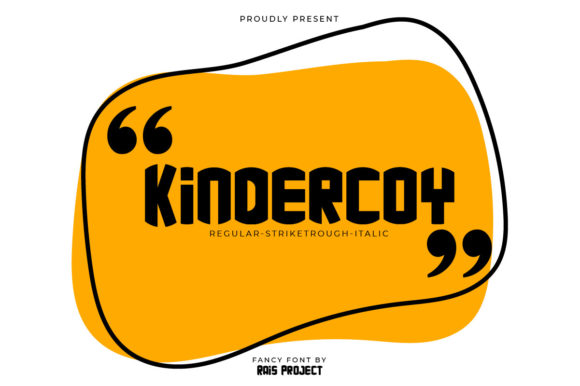
Kindercoy: Integrating a Bold, Robotic Display Font into Professional Design Workflows
In the landscape of digital and print design, typography is rarely just about readability; it is a primary vehicle for tone, brand identity, and visual hierarchy. Among the myriad of typefaces available to designers, Kindercoy stands out as a distinctive asset. It is not merely a font but a statement—a cool, bold, and robotic display typeface that brings an industrial yet playful energy to any layout. For professionals ranging from graphic designers and marketers to entrepreneurs and hobbyists, understanding how to integrate Kindercoy into a broader creative workflow is essential for maximizing its impact.
This article explores the practical application of Kindercoy in real-world projects. We will examine where this font fits within the design process, how it interacts with other visual elements, and specific strategies for implementation that ensure consistency, efficiency, and high-quality outcomes. Whether you are building a brand identity, creating social media assets, or designing event materials, Kindercoy offers a unique opportunity to elevate your visual communication.
Understanding the Role of Kindercoy in Visual Hierarchy
Before diving into technical implementation, it is crucial to define what Kindercoy does visually. As a display font, its purpose is not body text but rather headlines, titles, logos, and short phrases. Its "robotic" aesthetic suggests precision, technology, and modernity, while its "bold" weight ensures it commands attention. The "cool" factor implies a contemporary edge that resonates with audiences familiar with tech, gaming, or futuristic themes.
In a typical design workflow, hierarchy determines the order in which information is consumed. Kindercoy naturally sits at the top of this hierarchy. When used correctly, it acts as a visual anchor, drawing the eye immediately to key messages. However, because of its strong character, it requires careful handling to avoid overwhelming the viewer. This is where strategic planning comes into play.
The Balance of Contrast
The effectiveness of Kindercoy relies heavily on contrast. Because it is so dominant, it pairs best with neutral, clean, and highly legible sans-serif fonts for secondary information. Think of it as the lead singer in a band; the rest of the instruments (body text, captions, metadata) must support without competing. A common mistake among less experienced users is pairing another heavy or decorative font with Kindercoy, resulting in visual clutter. Instead, opt for simple geometric sans-serifs or even classic serifs if you are aiming for a retro-futuristic look.
- Primary Use: Headlines, Logos, Posters, Banner Ads.
- Secondary Pairing: Clean Sans-Serif (e.g., Helvetica, Arial, Open Sans).
- Avoid: Other decorative or script fonts.
Integration Across Different Creative Processes
Kindercoy’s versatility allows it to fit into various stages of a project lifecycle. Here is how it can be utilized before, during, and after the core creation phase.
Pre-Production: Branding and Concept Development
In the early stages of a project, such as branding for a new startup or a product launch, typography sets the mood. If your client or personal brand aligns with themes of innovation, robotics, gaming, or urban culture, Kindercoy should be considered during the mood board phase. Its robotic nature can instantly communicate a sense of forward-thinking and structural integrity.
When presenting concepts to stakeholders, using Kindercoy for mockups can help sell the idea of a bold, confident brand identity. However, always provide alternatives. Show how the font looks in isolation versus how it looks in context. This helps decision-makers understand the font’s potential limitations and strengths, leading to more informed choices.
Production: Execution and Layout Design
During the actual design execution, whether in Adobe Illustrator, Photoshop, Figma, or Canva, proper setup is key. Since Kindercoy is a display font, spacing and kerning become critical. Robotic fonts often have sharp angles and uniform thickness, which can create optical illusions if letters are too close together.
Practical Tip: Always check the tracking (letter-spacing) when using Kindercoy. Increasing tracking slightly can enhance the "futuristic" feel by giving the letters more breathing room, mimicking the space between mechanical components. Conversely, tight tracking might make the text look like a solid block, which can be effective for large-scale headers but risky for smaller sizes.
Furthermore, consider the medium of output. If you are designing for web, ensure that the font file is optimized. While display fonts are less frequently used than body fonts, loading a heavy custom font can impact page speed if not managed properly. Use subsetted font files or convert key headlines to SVG paths if static images are sufficient, ensuring fast load times without sacrificing visual quality.
Post-Production: Consistency and Asset Management
Once the design is complete, maintaining consistency across all platforms is vital. If Kindercoy is part of your brand toolkit, it must be applied uniformly across business cards, websites, social media graphics, and printed collateral. This is where organization becomes a productivity tool.
Create a dedicated style guide section for Kindercoy. Document the following:
- Minimum Size: Determine the smallest point size at which the font remains legible. Due to its bold and complex structure, it may lose detail at very small sizes.
- Color Constraints: Define which background colors work best. High contrast (black on white, white on black, or neon on dark grey) usually works best for robotic aesthetics.
- Usage Restrictions: Clearly state that the font should never be used for paragraphs or long-form text.
Workflow Efficiency and Tool Compatibility
For freelancers and agencies managing multiple clients, efficiency is paramount. Kindercoy can streamline certain aspects of design if integrated into reusable templates.
Template Creation
If you regularly produce social media posts, newsletters, or presentation decks, incorporate Kindercoy into your master templates. By pre-setting the font for slide titles or post headers, you reduce decision fatigue and ensure brand consistency. This is particularly useful for educators and bloggers who need to produce content quickly without compromising on visual appeal.
Most modern design tools, including Adobe Creative Cloud, Microsoft Office, and online platforms like Canva or Google Slides, support custom font uploads. Ensure you have the correct licensing for the intended use (personal vs. commercial) before adding the font to your library. Proper licensing prevents legal issues and allows you to use Kindercoy confidently in client projects.
Cross-Platform Consistency
One challenge with niche display fonts is ensuring they render consistently across different devices and operating systems. While web-safe fonts are ubiquitous, custom fonts like Kindercoy require embedding. Test your designs on mobile devices, tablets, and desktop monitors. The bold weight of Kindercoy might appear heavier on some screens due to anti-aliasing differences. Adjust weights or fallback options accordingly to maintain the intended visual impact.
Long-Term Value and Adaptability
Adding Kindercoy to your font library is a long-term investment. Trends in design shift, but the appeal of bold, geometric, and robotic typography has persisted for decades, evolving from cyberpunk aesthetics to modern tech minimalism. This timelessness makes it a valuable asset for any designer’s toolkit.
Moreover, Kindercoy’s "cool" and "bold" characteristics allow it to bridge gaps between different industries. It can work equally well for a tech conference, a children’s educational app (playing on the "Kinder" prefix with a twist), or a streetwear brand. This adaptability means you don’t need to buy multiple specialized fonts for every niche; one strong display font can serve multiple purposes if paired correctly.
Quality Control Checklist
Before finalizing any project featuring Kindercoy, run through this quick quality control checklist:
- Legibility: Is the text readable at the intended viewing distance?
- Contrast: Does the font stand out against the background?
- Pairing: Does the secondary font complement rather than compete?
- Spacing: Are kerning and tracking adjusted for optical balance?
- Context: Does the font match the overall tone and message of the project?
Conclusion
Kindercoy is more than just a font; it is a strategic design element that can significantly enhance the visual impact of your work. By understanding its robotic, bold nature and integrating it thoughtfully into your workflows, you can create designs that are not only aesthetically pleasing but also effective in communicating your message. From initial concept development to final production and long-term asset management, treating Kindercoy with respect and strategic intent will yield consistent, high-quality results. Whether you are a seasoned professional or a hobbyist looking to upgrade your design game, incorporating Kindercoy into your repertoire is a smart, practical step toward more dynamic and engaging visual communication.