Integrating MultiType Glitch Display Bold Into Modern Design Workflows
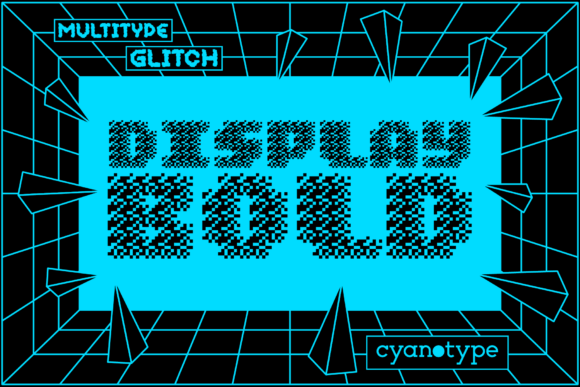
In the landscape of digital typography, finding a font that balances aesthetic impact with technical reliability is often a tedious process. Designers and developers frequently struggle to find typefaces that offer distinct character without compromising legibility or compatibility across various platforms. This is where MultiType Glitch Display Bold enters the workflow as a specialized tool rather than just a decorative element. It is a cool, uniquely shaped, pixelated display font designed to add a distorted and trendy touch to visual communications. Unlike standard sans-serif or serif fonts that aim for invisibility, this typeface demands attention, making it suitable for specific stages of a creative project where emphasis is required.
The core value of integrating MultiType Glitch Display Bold into your projects lies in its ability to convey a specific mood—digital disruption, retro-futurism, or high-energy modernity—while maintaining structural integrity. For professionals ranging from graphic designers to marketers and educators, understanding how to deploy such a distinctive font requires a shift in perspective. It is not merely about selecting a style; it is about managing the visual hierarchy and ensuring that the font serves the communication goal rather than overwhelming it. The following sections detail how to approach this font within practical workflows, focusing on preparation, implementation, and long-term asset management.
Understanding the Technical Foundation: PUA Encoding
Before diving into design applications, it is crucial to understand the technical architecture of the font file itself. MultiType Glitch Display Bold is PUA (Private Use Area) encoded. This is a significant factor in how you prepare your assets and integrate them into different software environments. The Private Use Area is a range of code points in Unicode that are reserved for private use by organizations, meaning they do not have predefined meanings in the standard Unicode specification. For the end-user, however, this encoding offers a distinct advantage: it allows access to all glyphs and swashes with ease.
When working with PUA-encoded fonts, the workflow changes slightly compared to standard OpenType fonts. In traditional workflows, designers rely on font features panels to toggle ligatures or alternate characters. With PUA encoding, every unique glyph, including the intricate swashes that define the glitch aesthetic, is mapped to a specific character code. This means that while you can access all available designs, you must be aware of how these characters interact with text editors, web browsers, and print drivers. Understanding this mechanism is the first step in efficient usage. It prevents the common issue of missing characters or garbled text when transferring files between different operating systems or design tools.
Preparation and Asset Organization
Effective integration begins with proper asset organization. Because MultiType Glitch Display Bold contains a wide array of special glyphs, keeping track of which character codes correspond to which visual elements is essential for consistency. A practical tip for creators is to create a dedicated reference sheet or a "cheat sheet" document within your project folder. This document should map the most frequently used swashes and glitch variants to their corresponding keyboard inputs or hex codes.
- Create a Glyph Map: Document the key swashes and alternate characters you plan to use. This reduces decision fatigue during the execution phase.
- Test Compatibility Early: Before committing to a full layout, test the font in your primary output medium. Whether it is a PDF for print, an HTML email, or a social media graphic, verify that the PUA characters render correctly.
- Backup Standard Alternatives: Always have a fallback font ready. If a client’s system does not support the PUA encoding properly, the design should still remain readable, even if the stylistic impact is diminished.
Strategic Application in Visual Hierarchy
The primary strength of MultiType Glitch Display Bold is its bold, pixelated nature. It commands space. Therefore, its application should be strategic rather than ubiquitous. Using this font for body text is generally discouraged due to its high visual weight and irregular shapes, which can reduce reading speed and comprehension. Instead, it fits best at the beginning or end of a visual journey—the headline, the call-to-action button, or the logo mark.
Consider the workflow of a marketing campaign. You might start with broad concepts and narrow down to specific executions. In the conceptual phase, this font helps establish a tone of innovation or disruption. During the execution phase, it is used sparingly to highlight key data points or headlines. By limiting its use, you preserve its impact. If every element on a page uses the glitch effect, the user experiences cognitive overload, and the message is lost. The goal is to use the font as a spotlight, not a floodlight.
Integration with Other Design Elements
When combining MultiType Glitch Display Bold with other tools and resources, contrast becomes your most important ally. Since the font has a jagged, distorted edge, pairing it with clean, minimalist elements creates a balanced composition. For example, using this font for a title against a solid, neutral background allows the pixelation to stand out without competing with complex imagery.
If you are working in a team environment, clear communication about font usage is vital. Define guidelines that specify when this font is appropriate. Is it for event posters? For tech product launches? For educational materials aimed at younger demographics? Establishing these boundaries ensures consistency across all deliverables. Consistency builds brand recognition, and in the case of a display font like this, consistency reinforces the intended emotional response.
Workflow Examples Across Different Industries
The versatility of MultiType Glitch Display Bold allows it to fit into various professional contexts. Here is how different roles might integrate this tool into their daily routines.
For Marketers and Entrepreneurs
Entrepreneurs often need to grab attention quickly in crowded digital spaces. Social media graphics benefit significantly from the trendy, distorted look of this font. When creating ad creatives, use the bold weight to make the headline pop. However, ensure that the text remains legible on mobile devices. Test the font size and spacing carefully. The pixelated edges can sometimes blur on low-resolution screens, so adjusting the kerning (spacing between letters) might be necessary to maintain clarity. Additionally, consider the color palette. High-contrast colors work best with glitch aesthetics, enhancing the sense of digital distortion.
For Educators and Content Creators
Educators and bloggers looking to engage students or readers with dynamic content can use this font to break up monotony. Imagine a presentation slide introducing a new technology concept. The title could feature MultiType Glitch Display Bold to visually represent the theme of innovation. Inside the presentation, stick to a more readable font for detailed explanations. This variation keeps the audience engaged without sacrificing information retention. For bloggers, using this font for featured images or pull quotes can increase click-through rates by adding visual interest to text-heavy pages.
For Freelancers and Publishers
Freelance designers and small publishers often work on tight deadlines. The ease of access provided by the PUA encoding is a time-saver. Instead of hunting through multiple font files for different effects, you have all the variations in one package. This streamlines the production process. When delivering final files to clients, remember to embed the font or convert text to outlines if the client needs to edit the file later. Converting to outlines ensures that the PUA characters are preserved exactly as designed, regardless of whether the recipient has the font installed.
Quality Control and Long-Term Maintenance
Once the design is complete, quality control is the final step in the workflow. Review the text for any rendering issues. Check the alignment of the pixelated edges. Ensure that the swashes do not overlap with adjacent elements in a way that creates visual clutter. Pay attention to the balance between the heavy font weight and the surrounding whitespace. Adequate breathing room around the text enhances readability and gives the design a premium feel.
Long-term use also involves considering the evolving nature of design trends. While the glitch aesthetic is currently popular, it may fade. However, having a well-organized library of such specialized fonts allows you to adapt quickly to changing market demands. Keep your font files updated and backed up. Regularly review your past projects to see what worked and what didn’t. This reflection helps refine your future implementations, ensuring that MultiType Glitch Display Bold remains a valuable asset in your toolkit rather than a novelty that loses its appeal.
Conclusion on Practical Integration
Integrating MultiType Glitch Display Bold into your design workflow requires a thoughtful approach that balances creativity with technical precision. By understanding its PUA encoding, organizing your assets effectively, and applying it strategically within visual hierarchies, you can leverage its unique qualities to enhance your projects. Whether you are a marketer seeking to boost engagement, an educator aiming to captivate students, or a designer crafting a bold brand identity, this font offers a powerful tool for expression. The key lies in disciplined usage, consistent application, and continuous refinement of your process. When used correctly, it transforms ordinary layouts into memorable visual experiences.